The sound of a child asking Alexa to play their favorite song has become as commonplace as requesting a bedtime story. Yet while artificial intelligence seamlessly integrates into our daily routines, most parents find themselves navigating uncharted territory when it comes to guiding their children’s AI interactions.

This comprehensive guide transforms complex AI concepts into practical family strategies, ensuring your household can harness AI’s benefits while maintaining safety, ethics, and human connection.
The AI Revolution in Your Living Room
Artificial intelligence isn’t coming to your family—it’s already there. From the personalized recommendations on Netflix that determine your weekend movie night to the predictive text that helps your teenager finish homework assignments, AI influences nearly every digital interaction your family experiences daily. Recent research reveals that over 60% of parents remain unaware of how AI affects their children online, creating a dangerous knowledge gap that leaves families vulnerable to AI’s inherent risks.
The rapid evolution of generative AI tools like ChatGPT, Google Gemini, and various image generators has fundamentally shifted the landscape. These aren’t merely advanced calculators or search engines—they’re sophisticated systems capable of creating content, solving problems, and engaging in seemingly human-like conversations. For children, whose cognitive capacities are still developing, this presents both unprecedented opportunities and unique vulnerabilities that require immediate parental attention.
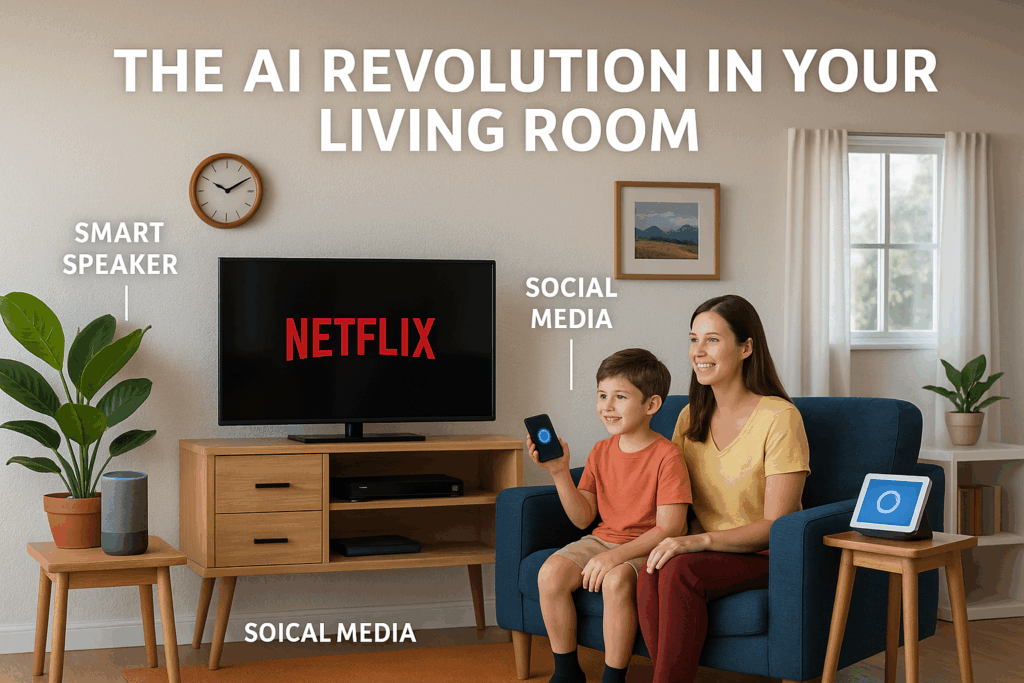
The challenge isn’t whether your children will encounter AI, but how well-equipped they’ll be to navigate it responsibly. This guide provides the framework for transforming your family into confident, critical AI users who can leverage these powerful tools while maintaining safety, creativity, and ethical standards. Did you notice the spelling of Social? It was left there to remind you that AI makes mistakes (it is an AI generated graphic).
Understanding AI: A Family-Friendly Foundation
What Exactly Is Artificial Intelligence?
Think of AI as a computer system trained to recognize patterns and make predictions based on vast amounts of data. Unlike traditional software that follows pre-programmed instructions, AI learns from examples and can generate new responses to situations it hasn’t explicitly encountered before.
For younger children (ages 5–8), explain AI using familiar concepts: “AI is like a very smart computer that has read millions of books and can help answer questions or create pictures. But just like people, it can sometimes make mistakes or give wrong answers.”
Teenagers can grasp more sophisticated concepts: “AI systems use complex mathematical models to process data and generate responses. They’re trained on massive datasets but don’t truly ‘understand’ content the way humans do—they identify statistical patterns and relationships.”
Generative AI vs. Traditional AI
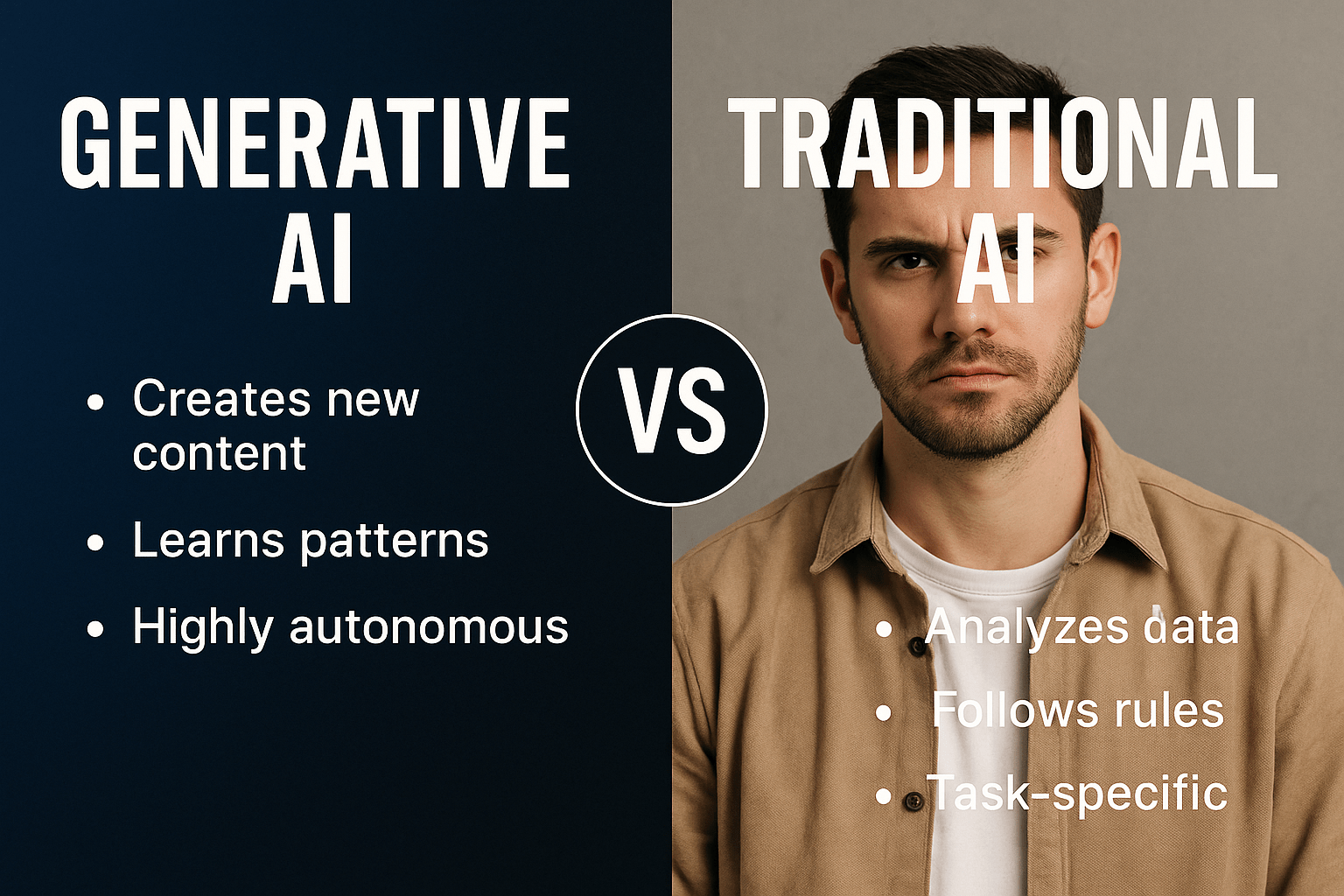
Traditional AI powers recommendation systems, navigation apps, and spam filters—tools that analyse existing information to make decisions. Generative AI, however, creates new content: writing stories, composing music, generating images, or solving problems through conversation [5].
This distinction is important because generative AI introduces both new risks and opportunities. While a recommendation algorithm might suggest inappropriate content, generative AI could create content that is specifically tailored to your child’s requests, potentially leading to inappropriate outcomes.
Family Activity: AI Scavenger Hunt. Walk through your home identifying AI-powered devices and services:
- Smart speakers and voice assistants
- Streaming service recommendations
- Social media content feeds
- Navigation apps in family vehicles
- Photo organization on family devices
- Predictive text on smartphones
This exercise helps families recognize AI’s current presence before introducing new AI tools.
Mastering Family-Friendly AI Prompts
The Fundamentals of Effective Prompting
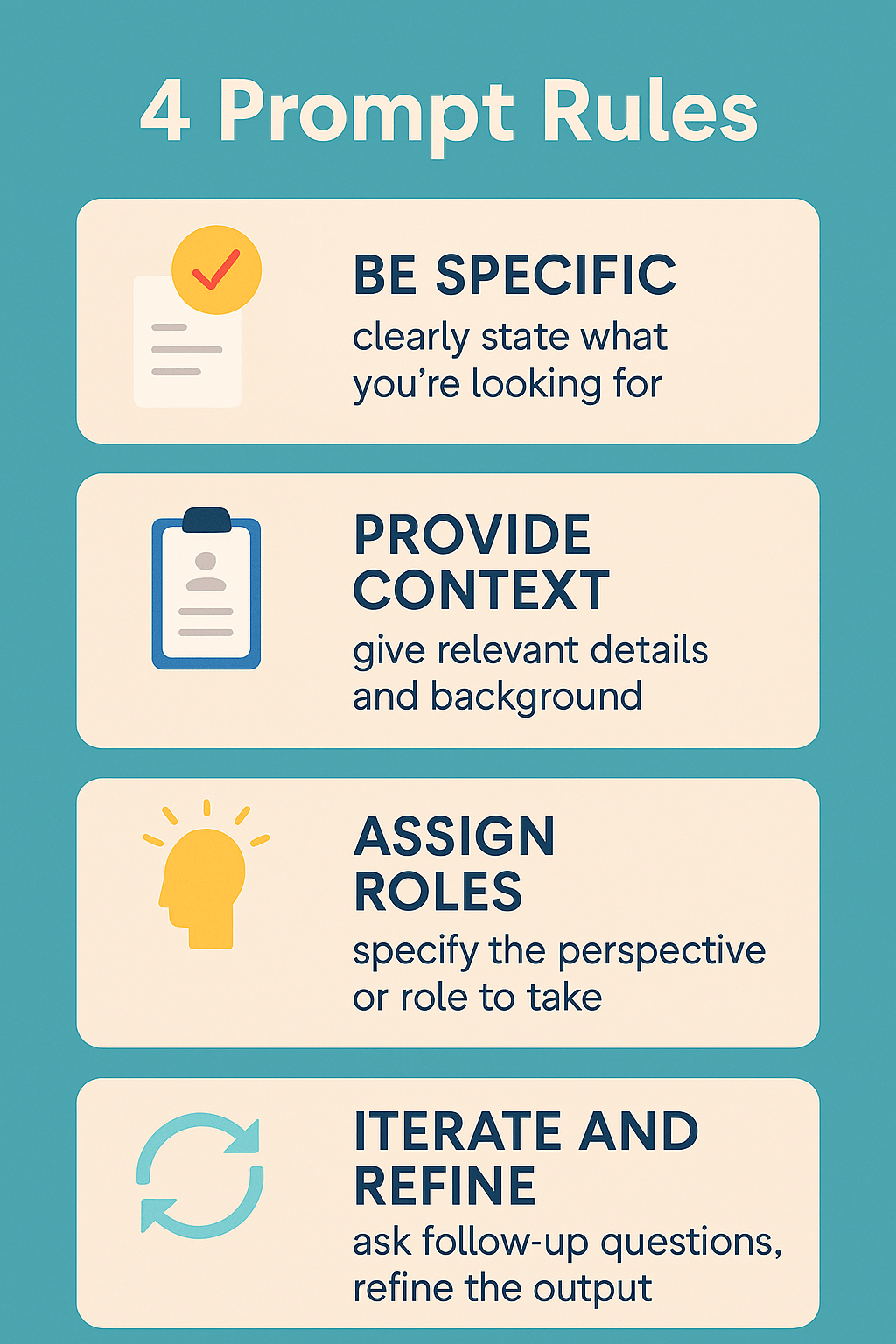
Successful AI interaction follows principles like clear human communication: specificity, context, and iterative refinement. The quality of AI responses directly correlates with the clarity and detail of your prompts.
Core Prompting Principles:
- Be Specific: Instead of “help with dinner,” try “suggest three healthy 30-minute dinner recipes using chicken, vegetables we have in the fridge, and ingredients a 7-year-old would enjoy.”
- Provide Context: Include relevant background information about your family’s needs, preferences, or constraints.
- Assign Roles: Direct the AI to adopt specific personas that match your needs—”acting as a patient child development expert” or “responding as an enthusiastic activity coordinator.”
- Iterate and Refine: Treat AI conversations as dialogues where you can ask follow-up questions or request modifications.
The Role-Playing Technique for Better Results
One of the most powerful strategies involves assigning specific roles to AI systems. This technique helps generate more tailored, empathetic, and relevant responses for family situations.
Effective Role Assignments:
- “Act as a calm and playful parenting coach.”
- “Respond as a patient tutor specializing in 4th-grade math.”
- “Take on the role of an imaginative activity planner for rainy days.”
- “Function as a family meal planning expert who considers picky eaters.
15 Practical Prompt Templates for Families
Meal Planning and Grocery Management:
- “Acting as a family nutrition expert, create a weekly meal plan for a family of four with one vegetarian teen, incorporating 3 slow-cooker meals and using seasonal vegetables available in [your location] during [current month].”
- “Help me create an organized grocery list for [specific meals], categorized by store sections, including estimated quantities for a family of [number].”
Homework Help and Educational Support:
- “As a patient 5th-grade teacher, explain [specific concept] using simple examples and suggest a hands-on activity to reinforce learning.”
- “Acting as a study skills coach, help create a study schedule for [specific subject] that breaks down material into 20-minute sessions over [timeframe].”
Creative Activities and Games:
- “Take on the role of a creative arts coordinator and suggest 5 indoor activities for ages [range] using common household items, focusing on activities that encourage collaboration rather than competition.”
- “Acting as an imaginative storytelling guide helps create an interactive story where my [age] year old can make choices that affect the outcome.”
Schedule and Organization Management:
- “Function as a family organization expert and help create a morning routine checklist for getting [number] kids aged [ages] ready for school in 45 minutes.”
- “As a time management coach, suggest strategies for balancing [specific activities] while ensuring adequate family time and homework completion.”
Learning New Skills Together:
- “Acting as an enthusiastic learning facilitator, design a 30-day family challenge to learn [specific skill], with age-appropriate tasks for participants aged [range].”
- “Take on the role of a patient instructor and break down [skill/concept] into simple steps a parent and [age] year old can practice together.”
Problem-Solving and Decision Making:
- “Function as a neutral family mediator and suggest fair solutions for [specific family conflict], considering perspectives of all ages involved.”
- “Acting as a wise counsellor, help brainstorm age-appropriate consequences for [specific behaviour] that focus on learning rather than punishment.”
Special Occasions and Memory Making:
- “Take on the role of an experienced party planner and suggest creative, budget-friendly ideas for celebrating [occasion] with [age] year olds.”
- “Acting as a memory-keeping expert, suggest meaningful ways to document and preserve [specific family experience or milestone].”
Technology and Digital Citizenship:
- “Function as a digital wellness coach and help create screen time agreements for [age] that balance entertainment, education, and offline activities.”
- “Acting as a cybersecurity expert, explain online privacy basics for [age] using age-appropriate examples and practical steps.”
Safety First: Protecting Your Family in the AI Age
Age-Appropriate AI Tools and Restrictions
Not all AI tools are created equal, and many popular platforms weren’t designed with children in mind. Understanding which tools are appropriate for different ages helps establish safe boundaries while allowing beneficial exploration.
Ages 5-8: Supervised Exploration Only
- Use AI tools together during family time
- Focus on creative applications like drawing assistants or story helpers
- Avoid unsupervised access to conversational AI
- Emphasis on understanding that AI is a tool, not a friend
Ages 9-12: Guided Independence
- Introduce educational AI tools with built-in safety features
- Establish clear rules about what information can be shared
- Regular check-ins about AI interactions and experiences
- Begin discussions about AI limitations and potential errors
Ages 13+: Responsible Autonomy
- Access to mainstream AI tools with ongoing guidance
- Focus on academic integrity and ethical use
- Encourage critical evaluation of AI-generated content
- Discussions about privacy, bias, and societal implications
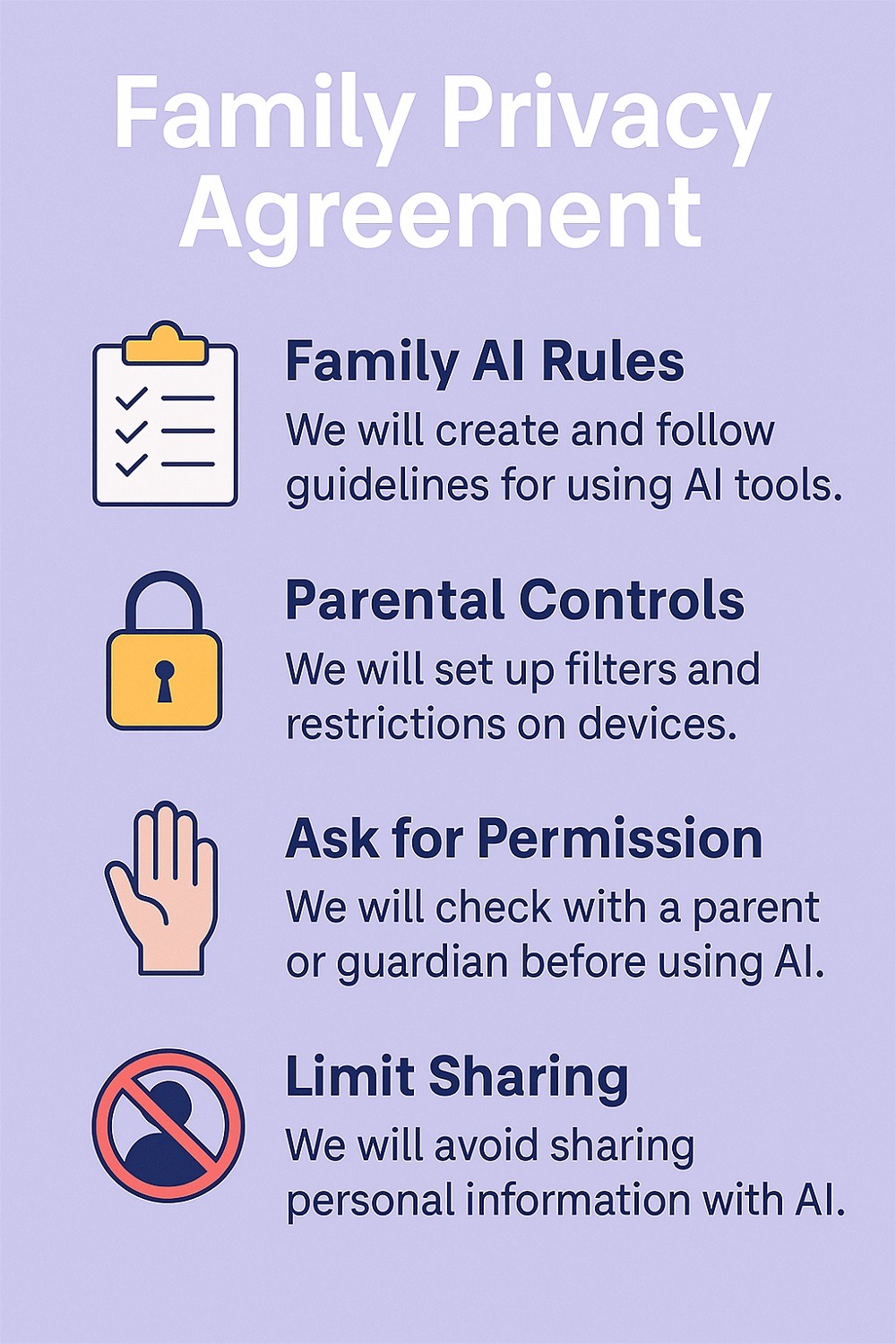
Privacy Protection Strategies
Protecting family data requires understanding how AI systems collect, store, and use information. Most AI platforms use conversations to improve their models, meaning your family’s inputs become part of the training data for future versions.
Essential Privacy Practices:
- Never input sensitive personal information (social security numbers, addresses, financial details)
- Review privacy policies before using new AI tools
- Use anonymous or fictional examples when possible
- Regularly delete conversation histories when platforms allow
- Consider using privacy-focused alternatives when available
Family Privacy Agreement Template: Create a family document outlining what information is safe to share with AI:
- ✅ General homework questions and academic topics
- ✅ Creative project ideas and brainstorming
- ✅ General advice about common situations
- ❌ Personal family problems or conflicts
- ❌ Financial information or family income
- ❌ Specific locations, school names, or identifying details
- ❌ Photos or personal images
Recognizing AI-Generated Content
As AI-generated content becomes increasingly sophisticated, teaching families to identify synthetic media becomes crucial for media literacy and safety.
Red Flags for AI-Generated Text:
- Unusually perfect grammar and structure
- Generic or overly formal language
- Lack of personal anecdotes or specific details
- Information that seems too good to be true
- Responses that avoid answering direct questions
Visual Content Warning Signs:
- Inconsistent lighting or shadows in images
- Unusual hand positions or finger counts in generated people
- Text that appears blurred or nonsensical
- Backgrounds that don’t match foreground elements
- Videos with lip-sync issues or unnatural movements
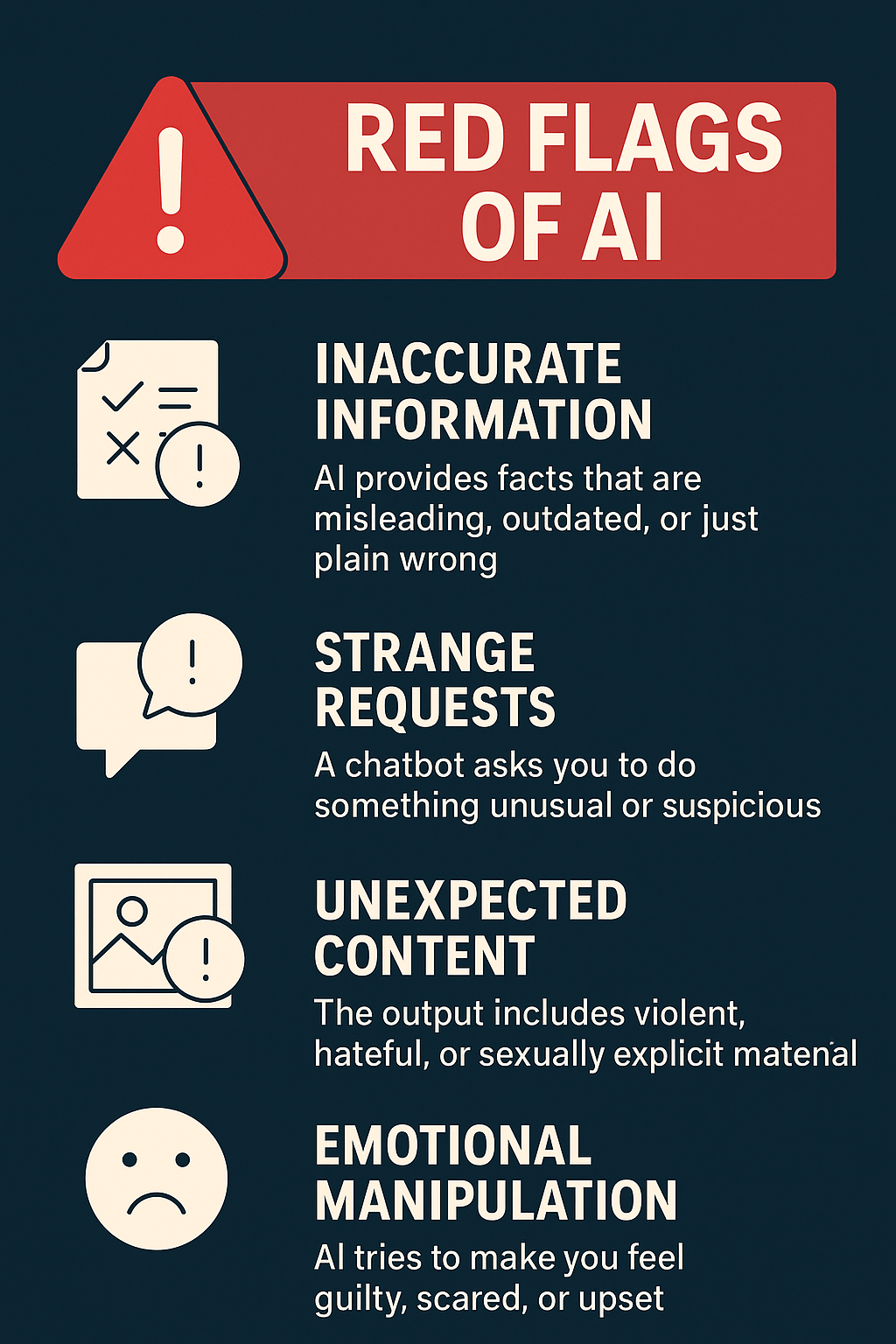
Red Flags for Harmful AI Interactions
Parents should watch for signs that AI interactions are becoming problematic or potentially harmful.
Concerning Behaviours:
- Spending excessive time in AI conversations
- Expressing emotional attachment to AI personalities
- Refusing to engage in offline activities
- Sharing increasingly personal information with AI
- Becoming secretive about AI use
- Reporting that AI is encouraging risky behaviours
Immediate Response Protocol:
- Document concerning interactions with screenshots
- Discuss the situation openly without judgment
- Review AI conversation histories together
- Implement additional supervision or restrictions
- Contact the platform support to report harmful content
- Consider professional guidance for persistent issues
Parental Control Recommendations
Effective AI safety requires a combination of built-in parental controls, third-party tools, and ongoing communication.
Device-Level Controls:
- Apple Screen Time: Set app limits and content restrictions
- Google Family Link: Monitor and control Android device usage
- Router-based filtering: Block inappropriate AI platforms network-wide
- Built-in browser controls: Enable safe search and content filtering
Third-Party Solutions:
- Qustodio: Comprehensive monitoring across multiple devices
- Bark: AI-powered monitoring of communications and content
- Circle Home Plus: Network-level content filtering and time management
Platform-Specific Settings:
- Enable conversation monitoring where available
- Set up content filtering for appropriate age levels
- Review and adjust privacy settings regularly
- Enable notifications for new account creation or app downloads
Building Critical Thinking Skills: The AI Detective Mindset
Teaching Kids to Question AI Outputs
Developing healthy scepticism toward AI-generated content requires teaching children to approach AI responses as starting points for investigation rather than final answers. This critical thinking framework helps families evaluate AI outputs systematically.
The Four-Question Framework:
- Is this accurate? Cross-reference facts with trusted sources
- Is this complete? Consider what information might be missing
- Is this appropriate? Evaluate content for age and situation suitability
- Is this helpful? Determine if the response addresses the need
Family Practice Activity: AI Fact-Checking Choose a topic everyone knows well (like your local area or a family hobby) and ask AI questions about it. Compare responses with your real-world knowledge to identify:
- Accurate information AI got right
- Details AI missed or got wrong
- Ways AI’s response could be improved
- Questions that might need human expertise
Bias Detection Activities
AI systems inherit biases from their training data, potentially perpetuating stereotypes or presenting skewed perspectives. Teaching families to recognize these biases develops critical media literacy skills.
Bias Exploration Exercises:
Activity 1: Character Description Bias Ask AI to describe people in various professions (doctor, nurse, engineer, teacher, CEO). Notice:
- Does AI default to specific genders for certain roles?
- Are descriptions culturally diverse or limiting?
- How does AI describe leadership styles or personality traits?
Activity 2: Historical Perspective Analysis Request AI explanations of historical events from different cultural viewpoints. Compare:
- Which perspectives are emphasized or minimized?
- How does framing affect understanding?
- What voices or experiences might be missing?
Activity 3: Problem-Solving Approach Bias. Present the same problem to AI multiple times with different context cues. Observe:
- How assumptions about location, culture, or resources affect solutions
- Whether AI suggests expensive or accessible approaches
- If recommendations, consider diverse family structures or circumstances
Fact-Checking Strategies
Effective fact-checking requires systematic approaches that children can learn and apply independently.
The SIFT Method (Adapted for Families):
- Stop: Pause before accepting or sharing AI-generated information
- Investigate: Look up claims using trusted sources
- Find: Locate original sources or expert commentary
- Trace: Follow information back to its origin when possible
Trusted Source Hierarchy for Fact-Checking:
- Primary sources (original research, government data, eyewitness accounts)
- Peer-reviewed academic publications
- Established news organizations with editorial standards
- Expert commentary from recognized authorities
- Multiple independent sources confirm the same information
Family Fact-Checking Toolkit:
- Bookmark reliable sources for common topics (health, science, current events)
- Teach children to check publication dates and author credentials
- Practice identifying red flags like sensational headlines or unsupported claims
- Create a family rule: “Two sources confirm before we believe.”
Academic Integrity Guidelines
As AI tools become prevalent in educational settings, families need clear guidelines for ethical academic use.
The Academic Integrity Framework:
Acceptable AI Use:
- Brainstorming ideas and organizing thoughts
- Explaining complex concepts or providing examples
- Proofreading for grammar and clarity
- Generating practice questions for self-testing
- Learning new study techniques or approaches
Unacceptable AI Use:
- Submitting AI-generated work as original content
- Using AI to complete assignments meant to assess personal knowledge
- Bypassing research requirements by asking AI instead of consulting sources
- Copying AI responses without understanding or verification
The “AI Attribution Standard”: When AI assistance is appropriate and allowed, teach children to document:
- Which AI tool was used and when
- What specific help was requested
- How the AI response was modified or verified
- What original thinking or work was added
School Policy Navigation:
- Review school policies on AI use with children
- Contact teachers when policies are unclear
- Discuss specific assignments and appropriate AI involvement
- Model transparency about AI use in family academic support
Family Discussion Prompts
Regular conversations about AI help normalize critical thinking and create opportunities for ongoing guidance.
Weekly AI Check-In Questions:
- “What’s something interesting you learned with or about AI this week?”
- “Did you encounter any AI responses that surprised or confused you?”
- “How did you decide whether to trust information you got from AI?”
- “What questions do you have about AI that we haven’t discussed?”
Ethical Dilemma Discussions:
- “If AI can write essays, what makes human writing valuable?”
- “Should AI be allowed to create art that competes with human artists?”
- “How do we balance AI’s helpfulness with the importance of learning to think for ourselves?”
- “What responsibilities do we have when sharing AI-generated content?”
The Ethical AI Family: Values in the Digital Age
Understanding AI Bias and Fairness
AI bias isn’t a technical glitch—it’s a reflection of human biases embedded in training data and development processes. Teaching families to recognize and address bias helps create more thoughtful AI users and advocates for fairer technology.
Types of Bias to Discuss:
Representation Bias: When AI training data doesn’t include diverse perspectives
- Family Example: If AI is primarily trained on English text might not understand cultural contexts from other languages
- Discussion Point: How does this affect families from different cultural backgrounds?
Historical Bias: When AI learns from data reflecting past discrimination
- Family Example: AI trained on historical hiring data might perpetuate gender or racial discrimination
- Discussion Point: How can we recognize when AI suggestions reflect old prejudices rather than current values?
Confirmation Bias: When AI reinforces existing beliefs rather than challenging them
- Family Example: AI that only provides information supporting views you already hold
- Discussion Point: How can we use AI to learn about different perspectives rather than just confirming what we think?
Family Bias Awareness Activities:
- Ask AI to describe “successful families” and notice what assumptions appear
- Request recommendations for books, movies, or activities and evaluate diversity
- Compare AI responses to the same question asked in different demographic contexts
- Discuss how your family’s unique experiences might differ from AI’s assumptions
Digital Citizenship Principles
Digital citizenship extends beyond online safety to encompass ethical participation in digital communities. AI interactions are increasingly part of this digital civic responsibility.
Core Digital Citizenship Values:
Respect: Treating AI systems and their outputs with appropriate consideration
- Avoiding attempts to manipulate AI for harmful purposes
- Respecting intellectual property, even in AI-generated content
- Understanding that AI responses affect how systems learn and develop
Responsibility: Accepting accountability for AI-assisted actions
- Verifying important information before acting on AI advice
- Acknowledging AI assistance in work when appropriate
- Taking responsibility for content shared after AI processing
Integrity: Maintaining honesty in AI interactions
- Being truthful about capabilities and limitations when using AI
- Avoiding deception about whether content is human or AI-generated
- Upholding academic and professional standards in AI use
Empathy: Considering how AI use affects others
- Recognizing when AI might replace human jobs or services
- Understanding that not everyone has equal access to AI tools
- Considering the environmental impact of computationally intensive AI systems
Environmental Impact Discussions
AI systems require significant computational resources, contributing to energy consumption and environmental impact. Including environmental considerations in family AI discussions builds awareness of technology’s broader consequences.
Environmental AI Education:
Energy Consumption Reality:
- Large AI models require massive amounts of electricity for training and operation
- Data centres powering AI services contribute to carbon emissions
- More complex AI requests (like image generation) use more energy than simple text queries
Family Environmental AI Practices:
- Use AI thoughtfully rather than casually or repeatedly for the same information
- Choose simpler AI tools when complex ones aren’t necessary
- Balance AI convenience with environmental responsibility
- Support companies working toward sustainable AI development
Discussion Questions:
- “How can we balance AI’s helpfulness with its environmental impact?”
- “What alternatives to AI might be better for the environment in some situations?”
- “How might AI technology help solve environmental problems even while using energy?”
When to Use (and Not Use) AI
Developing wisdom about appropriate AI use helps families maintain a balance between leveraging technology and preserving essential human skills.
Appropriate AI Use Scenarios:
- Brainstorming and creative inspiration
- Learning new concepts or skills
- Organizing information and planning
- Accessibility support for learning differences
- Exploring topics beyond immediate expert knowledge
Inappropriate AI Use Scenarios:
- Replacing critical thinking or problem-solving practice
- Making important decisions without human verification
- Substituting for human connection and relationships
- Bypassing learning opportunities that build essential skills
- Situations requiring personal judgment or emotional intelligence
The Human-First Principle: Before using AI, ask: “What human capabilities does this task help us develop?” If the answer involves important skills like critical thinking, creativity, empathy, or problem-solving, consider whether AI assistance helps or hinders that development.
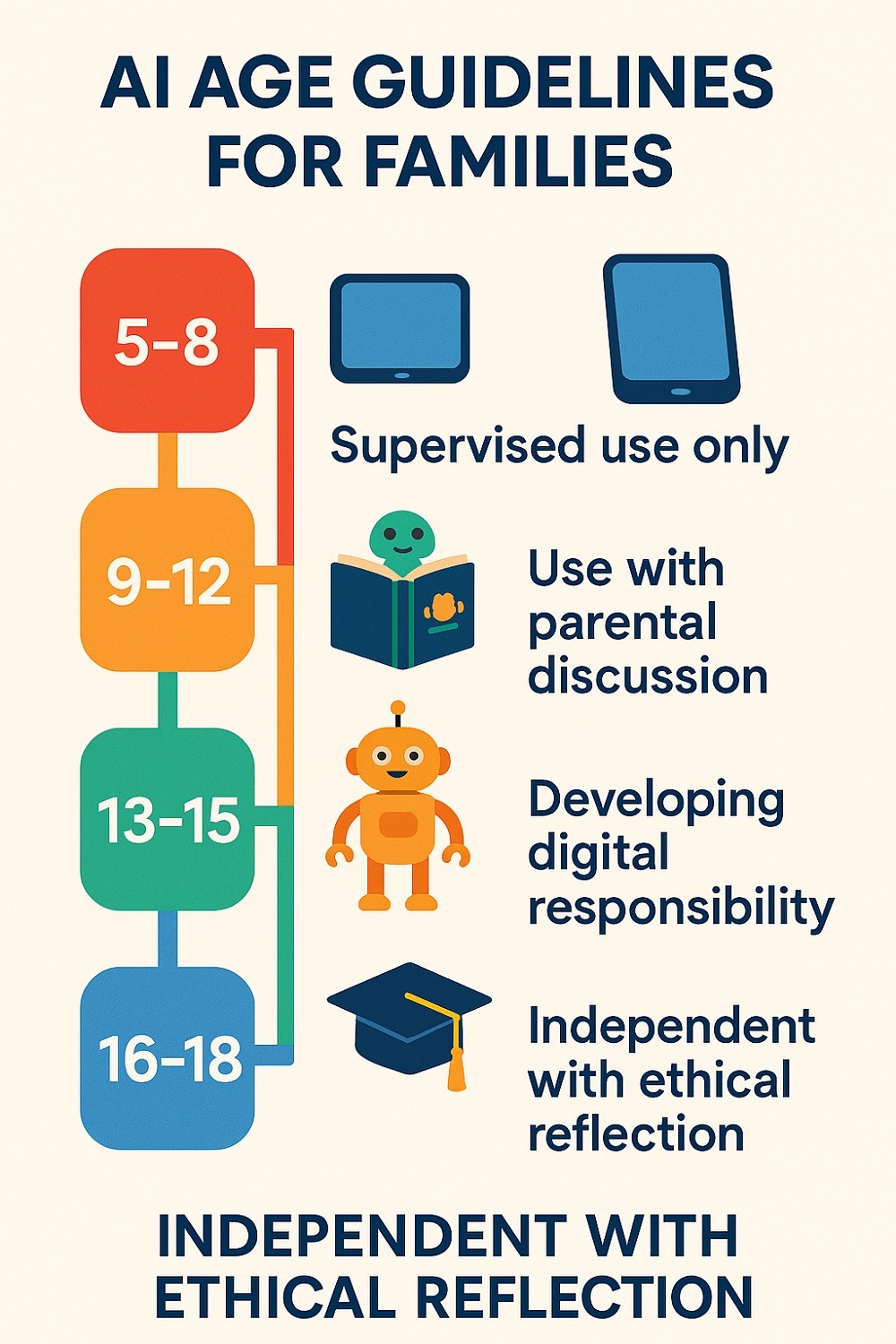
Age-Specific AI Guidelines: Growing with Technology
Early Childhood (Ages 5-8): Building Foundations
Young children need AI introduction that emphasizes curiosity, creativity, and safety while building foundational concepts about technology and artificial intelligence.
Developmental Considerations:
- Limited ability to distinguish between real and artificial
- High trust in authoritative sources
- Learning through play and exploration
- Beginning to understand rules and boundaries
Foundational Concepts to Introduce:
- Difference between things made by people and things made by computers
- Understanding that computers follow instructions from humans
- Recognition that not everything on screens is real
- Basic concept that AI is a tool, like other tools
Safe AI Activities for Young Children:
- Voice assistant interactions for weather, jokes, or music (with parent present)
- Drawing or colouring apps with AI assistance features
- Educational games that use AI for personalized learning
- Story creation tools with parent collaboration
Conversation Starters:
- “How do you think the computer knew to suggest that song?”
- “What’s the difference between a picture drawn by a person and one made by a computer?”
- “Why do we always check with grown-ups before believing what computers tell us?”
Supervision Guidelines:
- All AI interactions should include parent participation
- No unsupervised access to conversational AI
- Focus on AI as a family activity rather than individual use
- Emphasis on real-world verification of AI information
Middle Childhood (Ages 9-12): Building Skills
Children in this age range can begin developing practical AI skills while building critical thinking capabilities and understanding of AI limitations.
Developmental Readiness:
- Improved ability to evaluate information sources
- Growing independence in learning and problem-solving
- Increased understanding of rules and consequences
- Beginning awareness of bias and fairness
Skill Development Focus:
- Basic prompt writing for educational purposes
- Understanding that AI can make mistakes
- Recognition of bias in AI responses
- Beginning appreciation for privacy and data protection
Appropriate AI Applications:
- Homework assistance with proper verification
- Creative writing and art projects with AI collaboration
- Learning new subjects with AI tutoring support
- Family project planning and organization
Critical Thinking Development:
- Comparing AI responses with textbook or teacher information
- Practicing fact-checking with familiar topics
- Discussing why AI might give different answers to the same question
- Exploring how AI responses change based on how questions are asked
Independence Scaffolding:
- Supervised AI use with decreasing parent involvement
- Clear guidelines about appropriate information sharing
- Regular check-ins about AI experiences and questions
- Beginning responsibility for evaluating AI response quality
Teenagers (Ages 13+): Advanced Skills and Independence
Teenagers can develop sophisticated AI skills while grappling with complex ethical questions and preparing for adult-level AI interaction.
Advanced Capabilities:
- Abstract thinking about AI’s societal implications
- Understanding complex concepts like bias, privacy, and ethics
- Capability for independent research and verification
- Appreciation for nuanced decision-making
Skill Mastery Goals:
- Advanced prompt engineering for complex tasks
- Sophisticated evaluation of AI-generated content
- Understanding of AI limitations and appropriate use cases
- Ethical reasoning about AI use in academic and social contexts
Complex Applications:
- Research assistance with proper source verification
- Creative collaboration for artistic or literary projects
- Career exploration and skill development planning
- Social and political topic exploration with multiple perspectives
Ethical Reasoning Development:
- Debates about AI’s role in society and employment
- Discussion of AI bias and representation issues
- Exploration of privacy rights and data ownership
- Analysis of AI’s impact on creativity and human expression
Preparation for Adult AI Use:
- Understanding workplace AI policies and expectations
- Developing personal standards for AI use and disclosure
- Building skills for lifelong learning with AI assistance
- Creating frameworks for ethical decision-making in AI contexts
Progression Strategies for Growing with AI
The Spiral Learning Approach: Like the Day of AI curriculum model, revisit core concepts with increasing sophistication:
- Elementary: “AI helps computers answer questions.”
- Middle School: “AI learns patterns from data to make predictions.”
- High School: “AI systems use machine learning algorithms to process information and generate responses based on training data.”
Skill Building Progression:
Year 1: Foundation
- Basic AI awareness and safety
- Supervised exploration with simple tools
- Understanding AI vs. human-generated content
Year 2: Application
- Independent use of age-appropriate AI tools
- Basic prompt writing skills
- Beginning critical evaluation of responses
Year 3: Analysis
- Advanced prompting techniques
- Systematic fact-checking and verification
- Understanding bias and limitations
Year 4: Synthesis
- Ethical reasoning about AI use
- Creative collaboration with AI tools
- Preparation for adult-level AI interaction
Assessment Milestones:
- Can identify when AI might be inappropriate or insufficient
- Demonstrates consistent fact-checking habits
- Shows awareness of bias and seeks diverse perspectives
- Uses AI to enhance rather than replace learning
- Articulates personal values about AI use
Troubleshooting Common AI Challenges
When AI Gives Wrong Answers
AI systems can produce inaccurate, outdated, or completely fabricated information—a phenomenon known as “hallucination”. Teaching families to manage these situations builds resilience and critical thinking skills.
Common Types of AI Errors:
- Factual Inaccuracies: Wrong dates, statistics, or historical facts
- Outdated Information: Data that was correct but is no longer current
- Logical Inconsistencies: Responses that contradict themselves or common sense
- Source Fabrication: References to non-existent studies, books, or websites
- Context Misunderstanding: Responses that miss the point of the question
Family Response Protocol:
- Pause and Verify: Don’t act immediately on AI-provided information
- Cross-Reference: Check claims against trusted sources
- Ask Follow-Up Questions: Request sources or clarification from the AI
- Document Issues: Note patterns in AI errors for learning purposes
- Discuss Together: Use errors as teaching moments about critical thinking
Teaching Verification Skills:
- Show children how to fact-check using multiple reliable sources
- Practice identifying red flags that suggest AI might be wrong
- Demonstrate the difference between AI confidence and actual accuracy
- Create family challenges to find and correct AI mistakes
Managing Inappropriate Content
Despite safety measures, AI systems may occasionally generate content that’s inappropriate for children or families. Having clear response strategies helps manage these situations constructively.
Types of Inappropriate Content:
- Age-Inappropriate Language: Profanity or mature themes
- Biased or Discriminatory: Content reflecting harmful stereotypes
- Dangerous Information: Instructions for harmful activities
- Overly Personal: Responses that seem to “know” private information
- Manipulative: Content designed to influence behaviour inappropriately
Immediate Response Steps:
- Stop the Interaction: Don’t continue the conversation
- Screenshot Evidence: Document the problematic content
- Report to Platform: Use built-in reporting mechanisms
- Discuss with Family: Address any concerns or confusion
- Review Settings: Adjust safety controls if necessary
Prevention Strategies:
- Use AI platforms with robust content filtering
- Regularly review and update safety settings
- Maintain open communication about concerning interactions
- Teach children to recognize and report inappropriate content immediately
Managing Screen Time and AI Dependence
As AI tools become more engaging and helpful, families may struggle with overuse or unhealthy dependence on artificial intelligenc.
Warning Signs of AI Overdependence:
- Refusing to attempt tasks without AI assistance
- Preferring AI conversation to human interaction
- Anxiety when AI tools are unavailable
- Declining performance in tasks that require independent thinking
- Loss of interest in offline activities and relationships
Healthy AI Boundaries:
- Time Limits: Specific daily or weekly AI usage allowances
- Context Restrictions: AI-free zones like meals or family time
- Skill Development: Regular practice of tasks without AI assistance
- Human Priority: Emphasizing human relationships and activities
- Purpose-Driven Use: AI for specific goals rather than entertainment
Family AI Balance Strategies:
- Create “AI-free” family activities and discussions
- Encourage hobbies and interests that don’t involve technology
- Practice problem-solving without AI assistance
- Celebrate human creativity and original thinking
- Model healthy technology use as parents
School Policy Navigation
Educational institutions are rapidly developing AI policies, creating a complex landscape for families to navigate [28]. Understanding and respecting school guidelines while supporting children’s learning requires ongoing communication and flexibility.
Common School AI Policy Categories:
- Prohibited Use: AI is banned for all academic work
- Limited Permission: AI is allowed for specific subjects or assignments
- Disclosure Required: AI use must be acknowledged in assignments
- Teacher Discretion: Individual educators set their own policies
Family Navigation Strategies:
- Regular Communication: Check with teachers about current AI policies
- Assignment Clarification: Ask specific questions about AI use for individual projects
- Documentation: Keep records of AI use in academic work
- Transparency: Teach children to disclose AI assistance when uncertain about policies
- Advocacy: Participate in school discussions about AI policy development
Supporting Academic Integrity:
- Help children understand the purpose behind AI restrictions
- Practice completing assignments without AI assistance
- Develop strong research and writing skills independent of AI
- Discuss the value of original thinking and personal development
- Create home learning environments that complement school expectations
Looking Ahead: Future-Proofing Your Family
Emerging Trends to Watch
The AI landscape evolves rapidly, requiring families to stay informed about developments that might affect their household technology decisions and safety considerations.
Near-Term Developments (Next 1-2 Years):
- Multimodal AI: Systems that process text, images, audio, and video simultaneously
- Personalized AI Assistants: AI systems that learn individual family member preferences and needs
- Educational AI Integration: Widespread adoption of AI tutoring and learning support in schools
- Voice and Visual AI: Improved speech recognition and computer vision capabilities
Medium-Term Changes (3-5 Years):
- AI in Smart Homes: More sophisticated home automation and family assistance
- Creative AI Tools: Advanced systems for art, music, and storytelling collaboration
- Specialized Child AI: AI systems designed specifically for different developmental stages
- AI Regulation: Government policies affecting AI access and safety requirements
Long-Term Considerations (5+ Years):
- AI Companionship: More sophisticated AI relationships and social interactions
- Augmented Learning: AI-enhanced educational experiences and skill development
- Workplace AI Integration: AI tools becoming standard in most professional environments
- Ethical AI Standards: Industry-wide adoption of safety and fairness principles
Continuous Learning Strategies
Maintaining AI literacy requires ongoing education and adaptation as technology and social norms evolve [30].
Family Learning Approaches:
- Monthly AI Discussions: Regular conversations about new AI developments and family experiences
- Experimental Exploration: Trying new AI tools together and evaluating their usefulness and safety
- Community Engagement: Participating in school and community discussions about AI and technology
- Professional Development: Parents staying informed about AI through workshops, courses, or reading
- Intergenerational Learning: Children and parents teaching each other about different aspects of AI
Resource Development:
- Bookmark trusted sources for AI news and developments
- Subscribe to family-friendly technology newsletters
- Join parent communities focused on technology and digital safety
- Participate in school technology committees or parent organizations
- Follow educational technology experts and researchers
Building Adaptable AI Skills
Rather than focusing on specific AI tools that may become obsolete, families should develop transferable skills and thinking patterns that apply across AI technologies.
Core Transferable Skills:
- Critical Evaluation: Systematic approaches to assessing AI output quality and reliability
- Ethical Reasoning: Frameworks for making decisions about appropriate AI use
- Communication Skills: Ability to interact effectively with various AI systems
- Learning Agility: Capacity to quickly understand and adapt to new AI tools
- Digital Literacy: Understanding of how digital systems work and interact
Thinking Patterns for AI Interaction:
- Question Everything: Default scepticism balanced with openness to AI assistance
- Seek Multiple Perspectives: Using AI to explore different viewpoints rather than confirming existing beliefs
- Balance Efficiency and Learning: Choosing when AI help enhance vs. replace important skill development
- Maintain Human Connection: Prioritizing human relationships and experiences alongside AI interaction
- Consider Broader Impact: Thinking about how AI use affects others and society
The future of AI in family life will undoubtedly bring challenges we can’t yet anticipate. However, families that build strong foundations in critical thinking, ethical reasoning, and balanced technology use will be well-equipped to navigate whatever developments emerge. The goal isn’t to predict every future scenario, but to create adaptable family cultures that can thoughtfully integrate new technologies while preserving human values and connections.
Frequently Asked Questions
Q1: At what age should children start using AI tools?
A1: Children can begin supervised AI exploration as early as 5-6 years old with simple voice assistants for weather or music requests. However, independent AI use should wait until around 9-10 years old, when children develop better critical thinking skills and understanding of digital safety concepts.
Q2: How can I tell if my child is becoming too dependent on AI for homework?
A2: Warning signs include refusing to attempt assignments without AI, inability to explain AI-generated work, declining performance on tests despite good homework grades, and anxiety when AI tools are unavailable. Regular conversations about learning processes and occasional “AI-free” assignments can help assess true understanding.
Q3: Should I be concerned about AI collecting my family’s data?
A3: Yes, data privacy is a legitimate concern. Most AI platforms use conversations to improve their systems, potentially storing family information indefinitely. Avoid sharing sensitive personal details, review privacy policies, and consider using privacy-focused AI alternatives when available.
Q4: How do I explain AI bias to young children?
A4: Use simple examples they can understand: “Sometimes computers learn from information that isn’t fair to everyone, just like if someone only read books about one type of family, they might think that’s the only way families can be.” Focus on the importance of checking multiple sources and including diverse perspectives.
Q5: What should I do if AI generates inappropriate content for my child?
A5: Immediately stop the interaction, screenshot the content, report it to the platform, and discuss the situation openly with your child. Use it as a teaching moment about why human judgment remains important and why we verify AI responses with trusted sources.
Q6: How can I keep up with rapidly changing AI technology as a parent?
A6: Focus on fundamental principles rather than specific tools. Subscribe to family-friendly tech newsletters, participate in school technology discussions, and engage in monthly family conversations about AI experiences. Remember that your children can also be valuable sources of information about new developments.
Q7: Is it cheating if my child uses AI to help with creative writing assignments?
A7: This depends on your school’s specific policies and the assignment’s purpose. If the goal is to assess your child’s original thinking and writing skills, extensive AI use may undermine that assessment. When in doubt, contact the teacher for clarification and teach your child to disclose AI assistance when uncertain.
Q8: How do I balance AI’s educational benefits with screen time concerns?
A8: Treat AI use as a purposeful tool engagement rather than entertainment screen time. Set specific goals for AI interactions, limit session durations, and ensure AI use doesn’t replace offline learning activities, physical play, or human interaction. Quality and purpose matter more than quantity.
Q9: What’s the difference between AI hallucinations and simple mistakes?
A9: AI hallucinations involve the system generating completely fabricated information with confidence, like citing non-existent research studies or creating false statistics. Simple mistakes might be outdated information or minor factual errors. Both require verification, but hallucinations highlight AI’s fundamental limitations in understanding truth versus pattern matching.
Q10: Should I worry about AI replacing human creativity in my child’s development?
A10: AI works best as a creative collaborator rather than a replacement. Encourage your child to use AI for inspiration, brainstorming, and skill development while maintaining focus on original thinking, personal expression, and human experiences that inform authentic creativity.
Q11: How can I teach my teenager about AI ethics without being preachy?
A11: Engage in exploratory conversations rather than lectures. Ask questions like “What do you think about this AI response?” or “How might this affect different types of people?” Use current events and real examples to discuss complex issues. Encourage them to develop their own ethical frameworks rather than simply accepting rules.
Q12: What should families do if schools ban AI use entirely?
A12: Respect school policies while continuing age-appropriate AI education at home. Help children understand the educational reasons behind restrictions—developing independent thinking skills, ensuring original work, and building foundational knowledge. Use this as an opportunity to strengthen non-AI academic skills.
Q13: How do I address my child’s concerns about AI replacing human jobs?
A13: Acknowledge that AI will change the job market while emphasizing skills that remain uniquely human: creativity, empathy, complex problem-solving, and interpersonal communication. Focus on how AI can be a tool that enhances human capabilities rather than simply replacing them and discuss emerging careers that work alongside AI.
Q14: Is it safe for my family to use free AI tools, or should we pay for premium versions?
A14: Free AI tools can be safe when used appropriately, but premium versions often offer better privacy controls, content filtering, and customer support. Evaluate based on your family’s specific needs, budget, and privacy concerns. Always review terms of service regardless of cost.
Q15: How can I help my child develop healthy scepticism about AI without making them afraid of technology?
A15: Frame critical thinking as empowerment rather than fear. Teach verification skills as “becoming an AI detective” or “being smart about technology.” Celebrate when children catch AI mistakes or ask good questions about responses. Emphasize that questioning AI makes them better users, not fearful ones.
References:
[1] UNESCO. (2023). AI Competency Framework for Students. UNESCO Institute for Statistics.
[2] Secure Children’s Network. (2024). Parental Awareness Study: AI’s Impact on Children Online. UK Digital Safety Research.
[3] UNESCO. (2023). What you need to know about UNESCO’s new AI competency frameworks for students and teachers. UNESCO Education Sector.
[4] OECD. (2023). AI Principles and Guidelines for Educational Implementation. OECD Digital Education Outlook.
[5] Australian Government Department of Education. (2024). Framework for Generative Artificial Intelligence in Schools. Commonwealth of Australia.
[6] Microsoft Learn. (2024). Prompt engineering techniques – Azure OpenAI. Microsoft Corporation.
[7] AI4NGO. (2024). AI Handbook for NGOs: Best Practices for Family Guidance. Non-Profit Technology Collaborative.
[8] Government of Canada. (2024). Guide on the use of generative artificial intelligence. Public Services and Procurement Canada.
[9] Cornell University Center for Teaching Innovation. (2024). Ethical AI for Teaching and Learning. Cornell University.
[10] European Commission. (2024). The Commission publishes guidelines on the protection of minors in digital services. Digital Strategy Unit.
[11] Internet Matters. (2024). AI chatbots are the ‘go-to’ for millions of children. UK Digital Safety Organization.
[12] Common Sense Media. (2024). AI Toolkit for Families: Navigating Artificial Intelligence Together. Common Sense Media Research.
[13] Day of AI. (2024). Curriculum Framework for K-12 AI Education. MIT RAISE Initiative.
[14] Middlesex University. (2024). The intersection of AI and CSAM: a reflection on the UK’s Online Safety Act. Digital Rights Research Center.
[15] Digital Moment. (2024). Leading AI & Digital Literacy Education in Canada. Canadian Digital Education Alliance.
[16] UK Department for Education. (2024). Generative artificial intelligence (AI) in education. Crown Copyright.
[17] Singapore National Institute of Education. (2024). AI Education: The Essence is People. Nanyang Technological University.
[18] UNICEF. (2024). How can generative AI better serve children’s rights? UNICEF Innocenti Research Centre.
[19] Georgetown University Library. (2024). How to Craft Prompts – Artificial Intelligence Resources. Georgetown University Research Guides.
[20] European Parliament Think Tank. (2024). Children and generative AI: Policy Considerations. European Parliament Research Service.
[21] Japan Today. (2024). Tech tip: Get the most out of ChatGPT and other AI chatbots with better prompts. Japan Today Technology Section.
[22] SKOOL of Code. (2024). Understanding UNESCO’s AI Competency Framework: Essential Guide. Educational Technology Institute.
[23] Rutgers AI Ethics Lab. (2024). AI + Ethics Curricula for Middle School Youth: Lessons Learned. Rutgers University.
[24] Education Daily Australia. (2024). Surge in AI Literacy Initiatives as Australian Schools Prepare Students for the Future. Australian Education Media.
[25] LSE Blogs. (2024). The intersection of AI and CSAM: a reflection on the UK’s Online Safety Act. London School of Economics.
[26] Seattle’s Child. (2024). Navigating AI Use for Kids and Families: Tips for Parents. Seattle’s Child Magazine.
[27] The Well Connected Mom. (2024). How to Use AI for Families: Practical Applications and Safety. Family Technology Resources.
[28] C21 Canada. (2024). Anglophone East School District Artificial Intelligence Guidelines. 21st Century Learning Initiative.
[29] Friedrich Naumann Foundation. (2024). South Korea slows down on AI education: Global Policy Implications. Digital Education Policy Research.
[30] UNICEF USA. (2024). Closing the Digital Skills Gap: How UNICEF and Partners Are Empowering Youth Worldwide. UNICEF Digital Education Initiative.
[31] The Bump. (2024). The Viral AI Parenting Prompt Moms Use to Make Life Easier. Modern Parenting Technology Guide.
Citation Accuracy & Verification Statement
At TechLifeFuture, every article undergoes a multi-step fact-checking and citation audit process. We verify technical claims, research findings, and statistics against primary sources, authoritative journals, and trusted industry publications. Our editorial team adheres to Google’s EEAT (Expertise, Experience, Authoritativeness, and Trustworthiness) principles to ensure content integrity. If you have questions about any references used or would like to suggest improvements, please contact us at [email protected] with the subject line: Citation Feedback.
Legal and Professional Disclaimer
The content on TechLifeFuture.com is for educational and informational purposes only and does not constitute professional advice, consultation, or services. AI technologies evolve rapidly and vary in application. Always consult qualified professionals—such as data scientists, AI engineers, or legal experts—before implementing any strategies or technologies discussed. TechLifeFuture assumes no liability for actions taken based on this content.
Amazon Affiliate Disclosure
We are a participant in the Amazon Services LLC Associates Program, an affiliate advertising program designed to provide a means for us to earn fees by linking to Amazon.com and affiliated sites. If you click on an Amazon link and make a purchase, we may earn a small commission at no extra cost to you.
General Affiliate Disclosure
Some links in this article may be affiliate links. This means we may receive a commission if you sign up or purchase through those links—at no additional cost to you. Our editorial content remains independent, unbiased, and grounded in research and expertise. We only recommend tools, platforms, or courses we believe bring real value to our readers.